problem evidence
Content to follow.
The pill sits at the bottom center of every browser tab. It starts a Toggl timer in one click and opens the real "What are you working on?" card for task, project, and tags.
This page holds the three parts of the submission: the reasoning, the walkthrough video, and the working prototype in a real cloud browser with nothing to install.
An unofficial prototype by Shaurya Singh, built on the Toggl 2.0 browser extension for the Toggl Senior Product Manager assignment. Not affiliated with Toggl.
Why this friction, why it should bring a new user back in the first week, and what was left out.
Content to follow.
Content to follow.
Content to follow.
Content to follow.
Content to follow.
Content to follow.
Content to follow.
Content to follow.
Content to follow.
A five-minute walkthrough of the prototype: the choice, the trade-offs, the expected impact, and how AI was used.
The walkthrough video is embedded here once recorded.
A working build of the Toggl 2.0 extension with the pill added, running against the live product. Open it in the cloud, or install it yourself.
Freelancers and embedded contractors spend the day inside client tools: the client's Jira, a shared doc, a vendor portal, a custom admin. Toggl's extension puts a start button inside fourteen of those tools. Everywhere else, the fastest path is the toolbar popup: click the icon, then click play. The pill puts a one-click start at the bottom of every tab and its chevron opens the same timer card the popup uses.
see what changed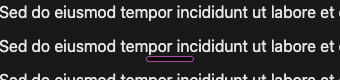
Idle, the pill is a six pixel bar. It turns purple and pulses while a timer is running.
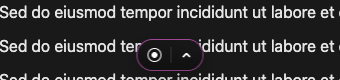
The bar grows into a dark control. Record starts a timer with one click. The chevron opens the timer card.
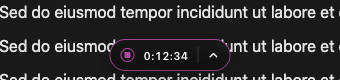
A running timer shows its elapsed time on hover, and the same button stops it. Every tab stays in sync.
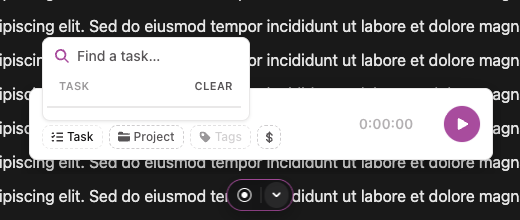
The chevron opens the real "What are you working on?" card with task, project, and tag pickers.
chrome://extensions or arc://extensions and turn on Developer mode.| file | change |
|---|---|
addedcontent-scripts/pill.js |
The pill itself. A shadow DOM control on every http and https tab. Start and stop go through the extension's own background service, the running entry is read from extension storage, and the flyout embeds the popup. |
addedpill-embed.css, pill-embed.js |
An embed mode for the popup, enabled by popup.html?embed=bar, that shows only the timer card and pins it to the bottom of a transparent frame so pickers open upward. popup.html loads both from its head. |
editedmanifest.json |
Adds the pill content script on every site, makes popup.html web accessible so the flyout can load it, renames the extension to "Toggl 2.0 (Pill)", and drops key and update_url so it installs beside the store build under its own ID and never auto-updates. |
Everything else in the folder is Toggl's unmodified extension code. The pill only sends messages to it, so sign-in, retries, caching, and analytics stay where they are.